In stock. In date. In range
Phial is a stock control app for healthcare teams. It tracks every batch in every location — fridges, store rooms, bags and kits — warns you before anything expires, keeps a temperature log for each of your fridges, and emails the right person to reorder, so nothing catches you out.
Today at a glance
All locations- Rapid flu test kits (A/B)Cupboard B · expires 18 Aug 2026 Expiring soon
- Wound closure stripsFirst aid kit · expired 29 Jul 2026 Expired
- Saline 0.9% 10ml podsStore room · expires 04 May 2027 In date
- Reagent vials (refrigerated)Vaccine fridge · expires 30 Sep 2026 Cold chain
Who it's for
Made for GP surgeries, vets, dentists and other healthcare teams
If your team keeps medicines, vaccines or consumables with expiry dates, Phial fits — one account per organisation, with every fridge, cupboard, branch and bag inside it.
GP surgeries
The vaccine fridge, the drug cupboard, the emergency bag and the doctor's bag — every batch in date across all of them, with branch surgeries in the same account and CQC evidence ready on the day.
Veterinary practices
Vaccines, fridge lines and consumables tracked batch by batch across every branch, with temperature logs and check records ready for your RCVS Practice Standards assessment.
Dental practices
Emergency drugs, local anaesthetic cartridges and materials all carry expiry dates. Phial watches every one and nudges the right person in time — nothing discovered out of date at the chairside.
Plenty of other healthcare teams keep stock that has to stay in date, and Phial works the same way for them:
How it works
Three simple steps
Phial fits the routine your team already has — record what arrives, check it weekly, and let the reminders do the worrying.
Record stock as it comes in
When a delivery arrives, log it in the app: product, batch number, expiry date and where it's stored. A few seconds per item, from any phone or computer.
Do a quick weekly check
Once a week, count what's on the shelf against what the app expects, item by item. Any difference is corrected and recorded — so the numbers always match reality.
Reminders come to you
Phial emails and alerts the right people when anything has expired, is going out of date soon, or has fallen below the reorder level you set — before it becomes a problem.
Why Phial
Why is it better than using a spreadsheet?
Most teams start with a spreadsheet — and most teams know exactly how that goes. Phial exists because keeping stock safe needs a few things a spreadsheet can't do.
Stop paying for stock you throw away
Every out-of-date item is bought twice — once to put it on the shelf, and again to replace it. Wasted medicines are estimated to cost the NHS around £300 million a year, and stock that quietly expires in fridges, cupboards and kits is part of that bill. Phial warns you weeks before anything goes out of date, so it gets used, moved or reordered in time — not binned.
New in Phial
Know your run rate — order just in time
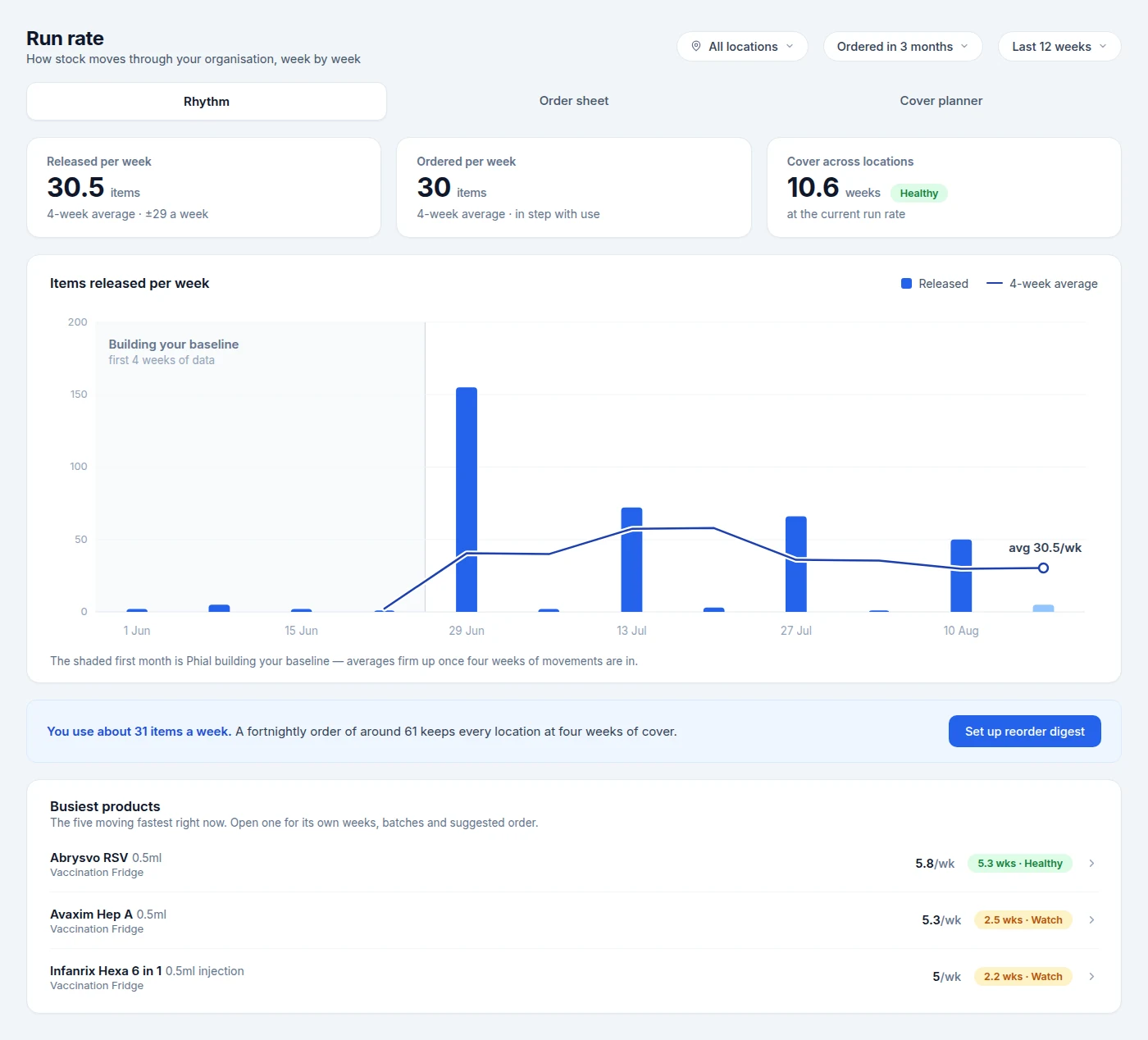
Phial knows what you have and when it expires. Now it learns your rhythm too: how much your team actually gets through each week, product by product — and turns it into ordering you don't have to think about.
After your first month of movements, Phial works out each product's weekly run rate from what really left the shelves — not a guess, your own usage. From there it tells you how many weeks of cover you hold and what to order this week, so stock arrives just in time — not just in case.
- A run rate for every product, learned from your first month of data
- Weeks of cover at a glance, so you see what will run out before it does
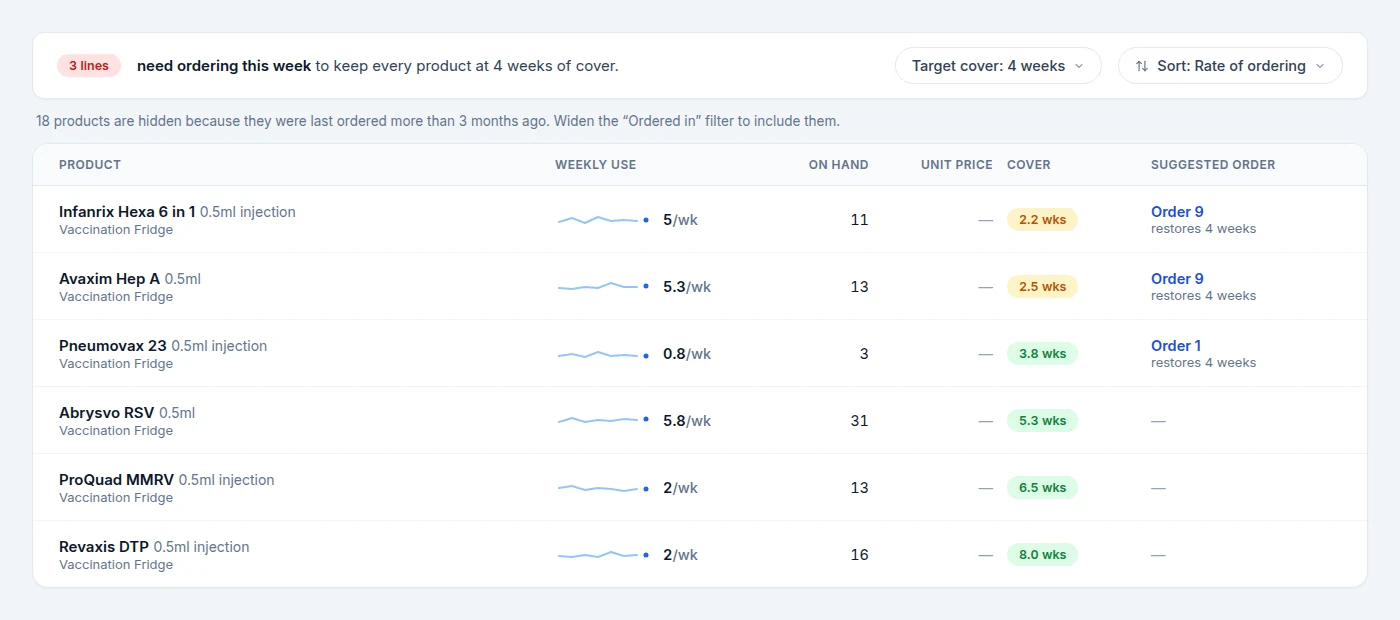
- A weekly order sheet with suggested quantities, sorted by what needs ordering first
- Plain-English advice — "a fortnightly order of around 61 keeps every location at four weeks of cover"
It spends your first month building a baseline before it makes a single suggestion — so the earlier you start recording, the sooner it pays off.
Order sheet
This week- Infanrix Hexa 6-in-15 a week · 2.2 weeks of cover Order 9
- Avaxim Hep A5.3 a week · 2.5 weeks of cover Order 9
- Pneumovax 230.8 a week · 3.8 weeks of cover Order 1
- Abrysvo RSV5.8 a week · 5.3 weeks of cover No order
- Rapid flu test kitsbuilding baseline · suggestions from 7 Sep Learning
Features
Built for busy teams
Expiry tracking
Every batch has its own expiry date. You choose the warning window; Phial flags what's close and what's gone.
Fridge temperature logs
Monitor every fridge you run, each with its own safe range (2–8°C by default) and up to six reading times a day. Reminders go to the staff responsible, and out-of-range readings raise an alert immediately.
Reorder digests
One email a day, only when something needs doing. Set the frequency for your organisation, from daily to monthly.
Weekly checks
A guided count that reconciles what's on the shelf with what's on the screen — and records every variance.
Complete audit trail
Every receipt, use, correction, disposal and temperature reading is recorded permanently — evidence for inspections without lifting a finger.
Staff access & locations
Invite staff with a one-time link, grant admin rights where needed, and allocate people to the fridges and locations they look after — so nudges reach the right person.
Locations & fridges
Several locations, several fridges — handled together
Stock rarely lives in one spot. Phial tracks the stock in every location and the temperature of every fridge at the same time — one account, one picture of everything.
Stock in every location
Record each batch against the place it actually lives — a fridge, the emergency bag, a cupboard, a room in another building. Counts, expiry warnings and reorder emails stay specific to each location.
A log for every fridge
Run one fridge or ten: each keeps its own safe range, reading times and temperature history, and today's readings for all of them sit on a single screen — so no fridge gets forgotten.
The right people per place
Allocate staff to the locations and fridges they look after, so reading reminders and reorder digests reach the team responsible — wherever the stock sits.
The emergency bag
Up to date when it matters most
An emergency is the one moment you can't send someone to check a date or fetch a replacement. Keeping the bag current isn't admin — it's clinical safety.
The contents of an emergency bag barely change, but every ampoule and inhaler in it carries its own expiry date — and any of them can quietly lapse between checks. Phial treats each bag as a location of its own: log the contents once, and every date is watched from that moment on.
- Every item logged once, with batch and expiry — then watched for you
- Warnings weeks ahead, so replacements are ordered and swapped in before anything lapses
- Every bag check recorded with a name and a date — evidence for the CQC or RCVS assessor
- Works the same for doctor's bags, resus trolleys and first aid kits
Emergency bag
Last checked 1 Aug 2026- Adrenaline 1:1000 1ml ampoules ×3Emergency bag · expires 14 Sep 2026 Expiring soon
- Aspirin 300mg dispersible ×8Emergency bag · expires 02 Mar 2027 In date
- GTN spray 400microgramsEmergency bag · expires 21 Jan 2027 In date
- Salbutamol 100micrograms inhalerEmergency bag · expires 30 Nov 2026 In date
Ready for inspection day
When the inspector asks how you manage your stock — whether that's the CQC or the RCVS Practice Standards assessor — the answer is on the screen: expiry compliance, fridge temperature logs, weekly check records, and a complete history of every movement of every batch.
- Permanent, tamper-proof movement history for every batch
- Dated temperature logs for every fridge, with breaches flagged
- Weekly reconciliation records with named checkers
- Expiry and disposal evidence, exportable when asked
Only the data it needs
Phial stores your stock records, fridge logs and staff sign-ins — nothing else. No patient or customer records ever enter the system, which keeps your information governance simple and your risk low. Read more on trust & security.
Pricing
Simple pricing, per practice
One subscription covers everything — every feature, unlimited users, and free migration of your existing stock when you join. No per-user charges, no long contract.
Your practice
Everything in Phial for your main site: stock, fridges, locations, alerts, weekly checks and the full audit trail — for the whole team.
Each branch site
Add branch surgeries and clinics to the same account — their own fridges, locations and reminders, one shared picture of stock.
Launch pricing for practices joining before 1 December 2026 — £500 per practice and £150 per branch site thereafter.
Book a trialFAQ
Common questions
What personal data does Phial hold?
Only your staff's name and work email (plus an optional mobile number) for sign-in and alerts. Nothing about your patients, clients or customers is ever entered or stored — Phial is a stock system, not a records system.
Can Phial record fridge temperatures?
Yes. Give every fridge its own safe range (2–8°C by default) and choose up to six reading times a day. The staff responsible get a reminder when a reading is due, every reading is logged with who took it and when, and anything out of range raises an alert immediately.
We have several storage locations and more than one fridge — can Phial cope?
Yes — that's the normal setup. Add as many locations as you need (fridges, cupboards, the emergency bag, rooms in another building) and mark any of them as a monitored fridge. Every batch is tracked against its location, every fridge keeps its own safe range and temperature log, and today's readings for all your fridges are recorded on one screen. Staff are allocated per location and per fridge, so each reminder reaches the team responsible — all in a single account.
Will it work on our network?
Yes — Phial runs in any modern browser with nothing to install. If your organisation uses network filtering, we provide your IT team a short note covering the domains to allow, and we're happy to complete any security questionnaire you use.
How long does setup take?
Most organisations are running within a day: we set up your account, you invite your staff with a link, and the first stock take — logging what's currently on the shelves — is the only real job. After that it's seconds per delivery.
We already track our stock in a spreadsheet or another system — do we have to start again?
No — and you won't be retyping it all yourself. When you subscribe we'll migrate your existing stock across for you, free of charge: your products, batches and expiry dates arrive in Phial ready to go. Anything left over is quick to add — log it as deliveries arrive, or enter a shelf at a time during your first weekly check.
How does the trial work?
We set up two locations for you: your vaccine fridge and your emergency bag. We'll work with you to bring your existing spreadsheets or checklists across, and their products, batches and expiry dates are in Phial within a day — so you see it working on your own stock straight away. From there you have a month to use the system free, with nothing held back: invite the rest of the team, try any feature, and add further locations yourself in minutes — logging stock is the same job you'll do when deliveries arrive, so you'll know exactly what living with Phial feels like. There's no commitment at the end, and once you're happy and decide to buy, we'll migrate all of your stock across for you.
What does it cost?
£350 a year for your practice plus £50 a year for each branch site if you join before 1 December 2026 — £500 and £150 thereafter. That includes every feature, unlimited users and free migration of your existing stock when you join, with no per-user charges and no long contract. Book a trial and we'll set up your fridge and emergency bag for you to use free for a month first.
Start with your fridge and your emergency bag, free for a month
We'll work with you to bring your existing spreadsheets across, so both locations are in Phial within a day — every product, batch and expiry date — and you see it working on your own stock straight away. Then the month is yours with nothing held back: add more locations in minutes, invite the whole team, and by week four Phial has learned your run rates and started suggesting orders. Once you're happy and decide to buy, we'll migrate all of your stock across for you.